
# AtomicDEX API (Dev - v2.0)
# Account Balance Tasks
If you have activated a coin with the task::enable_utxo::init or task::enable_qtum::init and used the "priv_key_policy": "Trezor" parameter, your funds may be spread across a range of addresses under a specified account index. The methods below will return the combined balance of your account, detailing the balance for each active account address.
# task_account_balance_init
Use the task::account_balance::init method to initialise an account balance request.
# Arguments
| Parameter | Type | Description |
|---|---|---|
| coin | string | Ticker of activated coin you want to see addresses and balance for |
| account_index | string | For GUIs, this will be zero. In CLI you can use other values if you know what you are doing (opens new window) |
# Response
| Parameter | Type | Description |
|---|---|---|
| task_id | integer | An identifying number which is used to query task status. |
# 📌 Examples
# Command
curl --url "http://127.0.0.1:7783" --data "{
    \"userpass\": \"$userpass\",
    \"mmrpc\": \"2.0\",
    \"method\": \"task::account_balance::init\",
    \"params\": {
        \"coin\": \"COIN_NAME\",
        \"account_index\": 0
    }
}"
# Response (ready, successful)
{
    "mmrpc": "2.0",
    "result": {
        "task_id": 6
    },
    "id": null
}
# task_account_balance_status
Use the task::account_balance::status method to view the status / response of an account balance request.
# Arguments
| Parameter | Type | Description |
|---|---|---|
| task_id | integer | The identifying number returned when initiating the withdrawal process. |
| forget_if_finished | boolean | If false, will return final response for completed tasks. Optional, defaults to true. |
# Response
| Parameter | Type | Description |
|---|---|---|
| result | object | Object containing status and details of the task |
| .status | string | Status of the task (Ok or Error) |
| ..account_index | integer | For GUIs, this will return 0. In CLI it will return the same as the user request input |
| ..derivation_path | string | The The BIP44 derivation path (opens new window) of the wallet. |
| ..total_balance | object | Contains the spendable and unspendable balance for the wallet |
| ...spendable | string(numeric) | Spendable balance for this wallet |
| ...unspendable | string(numeric) | Unspendable balance for this wallet (e.g. from unconfirmed incoming transactions) |
| ..addresses | list | Contains information about current active addresses in the wallet |
| ...address | string | Spendable balance for this address |
| ...derivation_path | string | The The BIP44 derivation path (opens new window) of an address. |
| ...chain | string(numeric) | Internal or External. External is used for addresses that are meant to be visible outside of the wallet (e.g. for receiving payments). Internal is used for addresses which are not meant to be visible outside of the wallet and is used for return transaction change. |
| ...balance | object | Contains the spendable and unspendable balance for this address |
| ....spendable | string(numeric) | Spendable balance for this address |
| ....unspendable | string(numeric) | Unspendable balance for this address (e.g. from unconfirmed incoming transactions) |
# 📌 Examples
# Command
curl --url "http://127.0.0.1:7783" --data "{
    \"userpass\": \"$userpass\",
    \"mmrpc\": \"2.0\",
    \"method\": \"task::account_balance::status\",
    \"params\": {
        \"task_id\": TASK_ID,
        \"forget_if_finished\": false
    }
}"
# Response (ready, successful)
{
    "mmrpc": "2.0",
    "result": {
        "status": "Ok",
        "details": {
            "account_index": 0,
            "derivation_path": "m/44'/20'/0'",
            "total_balance": {
                "spendable": "99.999",
                "unspendable": "0"
            },
            "addresses": [{
                "address": "DJdsr4Mhqm1afkbxwBJfwH6236xNh5kJZU",
                "derivation_path": "m/44'/20'/0'/0/0",
                "chain": "External",
                "balance": {
                    "spendable": "49.999",
                    "unspendable": "0"
                }
            }, {
                "address": "DJdsr4Mhqm1afkbxwBJfwH6236xNh5kJZU",
                "derivation_path": "m/44'/20'/0'/0/1",
                "chain": "External",
                "balance": {
                    "spendable": "50",
                    "unspendable": "0"
                }
            }, {
                "address": "DJdsr4Mhqm1afkbxwBJfwH6236xNh5kJZU",
                "derivation_path": "m/44'/20'/0'/0/2",
                "chain": "External",
                "balance": {
                    "spendable": "0",
                    "unspendable": "0"
                }
            }]
        }
    },
    "id": null
}
# task_account_balance_cancel
Use the task::account_balance::cancel method to cancel an account balance request.
# Arguments
| Parameter | Type | Description |
|---|---|---|
| task_id | integer | The identifying number returned when initiating the withdrawal process. |
# Response
| Parameter | Type | Description |
|---|---|---|
| result | string | Returns with value success when successful, otherwise returns the error values below |
| error | string | Description of the error |
| error_path | string | Used for debugging. A reference to the function in code base which returned the error |
| error_trace | string | Used for debugging. A trace of lines of code which led to the returned error |
| error_type | string | An enumerated error identifier to indicate the category of error |
| error_data | string | Additonal context for the error type |
# 📌 Examples
# Command
curl --url "http://127.0.0.1:7783" --data "{
    \"userpass\": \"$userpass\",
    \"mmrpc\": \"2.0\",
    \"method\": \"task::account_balance::cancel\",
    \"params\": {
        \"task_id\": TASK_ID
    }
}"
# Response (ready, successful)
{
    "mmrpc": "2.0",
    "result": "success",
    "id": null
}
# Response (error, task already finished)
{
    "mmrpc": "2.0",
    "error": "Task is finished already",
    "error_path": "init_account_balance.manager",
    "error_trace": "init_account_balance:113] manager:104]",
    "error_type": "TaskFinished",
    "error_data": 2,
    "id": null
}
# task_enable_utxo_init
UTXO coins are activated using this method. For QTUM coins, refer to task::enable_qtum::init
# Arguments
| Parameter | Type | Description |
|---|---|---|
| ticker | string | The ticker of the coin you want to enable. |
| activation_params | object | An object containing the actvation parameters below. |
| .priv_key_policy | string | Defaults to ContextPrivkey. Set as Trezor to activate in Trezor mode. |
| .min_addresses_number | integer | How many additional addreesses to generate at a minimum. |
| .scan_policy | string | Whether or not to scan for new addresses. Select from do_not_scan, scan_if_new_wallet or scan. Note that scan will result in multple requests to the AtomicDEX-API. |
| .gap_limit | integer | The max number of empty addresses in a row. If transactions were sent to an address outside the gap_limit, they will not be identified when scanning. |
| .mode | object | An object containing RPC type and data parameters as below. |
| ..rpc | string | UTXO RPC mode. Options: { "rpc":"Native" } if running a native blockchain node, or "rpc":"Electrum" to use electrum RPCs. If using electrum, a list of electrum servers is required under rpc_data.servers |
| ..rpc_data | object | An object containing electrum server information. |
| ...servers | list | A list of electrum server URLs |
| ....url | object | The url and port of a coins electrum server |
| ....ws_url | object | Optional. Used to define electrum server url/port for websocket connections. |
| ....protocol | object | Defines electrum server protocol as TCP or SSL. Defaults to TCP |
| ....disable_cert_verification | boolean | Optional. For SSL electrum connections, this will allow expired certificates. |
# Response
| Parameter | Type | Description |
|---|---|---|
| task_id | integer | An identifying number which is used to query task status. |
# 📌 Examples
# Command
#!/bin/bash
source userpass
curl --url "http://127.0.0.1:7783" --data "{
    \"userpass\": \"$userpass\",
    \"mmrpc\": \"2.0\",
    \"method\": \"task::enable_utxo::init\",
    \"params\": {
        \"ticker\": \"KMD\",
        \"activation_params\": {
            \"mode\": {
                \"rpc\": \"Electrum\",
                \"rpc_data\": {
                    \"servers\": [
                        {
                            \"url\": \"electrum2.cipig.net:10001\"
                        },
                        {
                            \"url\": \"electrum3.cipig.net:20001\",
                            \"ws_url\": \"electrum3.cipig.net:30001\",
                            \"protocol\": \"SSL\"
                        }
                    ]
                }
            },
            \"scan_policy\": \"scan_if_new_wallet\",
            \"priv_key_policy\": \"Trezor\",
            \"min_addresses_number\": 3,
            \"gap_limit\": 20
        }
    }
}"
# Response
{
    "mmrpc": "2.0",
    "result":{
        "task_id": 1
    },
    "id": null
}
# task_enable_utxo_status
After running the task::enable_utxo::init method, we can query the status of activation to check its progress.
The response will return the following:
- Result of the task (success or error)
- Progress status (what state the task is in)
- Required user action (what user should do before the task can continue)
# Arguments
| Parameter | Type | Description |
|---|---|---|
| task_id | integer | The identifying number returned when initiating the initialisation process. |
| forget_if_finished | boolean | If false, will return final response for completed tasks. Optional, defaults to true. |
# Command
curl --url "http://127.0.0.1:7783" --data "{
    \"userpass\": \"YOUR_PASS\",
    \"mmrpc\": \"2.0\",
    \"method\": \"task::enable_utxo::status\",
    \"params\": {
        \"task_id\": 0,
        \"forget_if_finished\": false
    }
}"
# Response (ready, successful, Trezor mode)
| Parameter | Type | Description |
|---|---|---|
| status | string | A short indication of how the requested process is progressing. |
| details.result | object | Depending on the state of process progress, this will contain different information as detailed in the items below. |
| .ticker | string | The ticker of the coin being activated |
| .current_block | integer | The block height of the coin being activated |
| .wallet_balance | object | Information about the addresses of the coin being activated |
| ..wallet_type | string | In Trezor mode, this will return HD |
| ..accounts | list | A list of addresses and related information for the coin being activated |
| ...account_index | integer | ACCOUNT_ID child in the m/44'/COIN'/ACCOUNT_ID'/CHAIN/ADDRESS_ID BIP44 derivation path. Please don't confuse with mm2 global Iguana/HD/HW account. |
| ...derivation_path | string | Derivation path up to the COIN child. E.g. "m/44'/141'/0'" |
| ...total_balance | object | Combined total spendable and unconfirmed balances of all account addresses |
| ....spendable | string(numeric) | Combined total spendable balance of all account addreesses |
| ....unspendable | string(numeric) | Combined total unspendable balance of all account addreesses |
| ...addresses | list | A list of addresses in the account for the coin being activated |
| ....address | string | One of the addresses in the account for the coin being activated |
| ....derivation_path | string | The BIP44 derivation path (opens new window) of the address. |
| ....chain | string | Returns External when CHAIN=0 in the m/44'/COIN'/ACCOUNT_ID'/CHAIN/ADDRESS_ID derivation path. Returns Internal when CHAIN=1 in the m/44'/COIN'/ACCOUNT_ID'/CHAIN/ADDRESS_ID derivation path. External is used for addresses that are meant to be visible outside of the wallet (e.g. for receiving payments). Internal is used for addresses which are not meant to be visible outside of the wallet and is used for return transaction change. |
| ....balance | object | Contains the spendable and unspendable balance for this address |
| .....spendable | string(numeric) | Spendable balance for this address |
| .....unspendable | string(numeric) | Unspendable balance for this address (e.g. from unconfirmed incoming transactions) |
{
    "mmrpc": "2.0",
    "result": {
        "status": "Ok",
        "details": {
            "result": {
                "ticker": "RICK",
                "current_block": 1529989,
                "wallet_balance": {
                    "wallet_type": "HD",
                    "accounts": [
                        {
                            "account_index": 0,
                            "derivation_path": "m/44'/141'/0'",
                            "total_balance": {
                                "spendable": "7.74199",
                                "unspendable": "0"
                            },
                            "addresses": [
                                {
                                    "address": "RFarfkYdmMVv9q4dHTmHUgS5j6nBy6qate",
                                    "derivation_path": "m/44'/141'/0'/0/0",
                                    "chain": "External",
                                    "balance": {
                                        "spendable": "0",
                                        "unspendable": "0"
                                    }
                                },
                                {
                                    "address": "RUu1JYSAYVmSLL2Nb5eLNdenp1JtHcReYZ",
                                    "derivation_path": "m/44'/141'/0'/0/1",
                                    "chain": "External",
                                    "balance": {
                                        "spendable": "7.74199",
                                        "unspendable": "0"
                                    }
                                },
                                {
                                    "address": "RTnduXSuRJegfMXf7nQM6C5gS68sbpL7AY",
                                    "derivation_path": "m/44'/141'/0'/1/0",
                                    "chain": "Internal",
                                    "balance": {
                                        "spendable": "0",
                                        "unspendable": "0"
                                    }
                                }
                            ]
                        }
                    ]
                }
            }
        }
    },
    "id": null
}
# Response (ready, successful, Iguana mode)
| Parameter | Type | Description |
|---|---|---|
| status | string | A short indication of how the requested process is progressing. |
| details.result | object | Depending on the state of process progress, this will contain different information as detailed in the items below. |
| .ticker | string | The ticker of the coin being activated |
| .current_block | integer | The block height of the coin being activated |
| .wallet_balance | object | Information about the addresses of the coin being activated |
| ..wallet_type | string | In Trezor mode, this will return HD |
| ..address | string | One of the addresses in the account for the coin being activated |
| ..balance | object | Contains the spendable and unspendable balance for this address |
| ...spendable | string(numeric) | Spendable balance for this address |
| ...unspendable | string(numeric) | Unspendable balance for this address (e.g. from unconfirmed incoming transactions) |
{
    "mmrpc": "2.0",
    "result": {
        "status": "Ok",
        "details": {
            "result": {
                "current_block": 1531669,
                "wallet_balance": {
                    "wallet_type": "Iguana",
                    "address": "RKK5UzcZnXBZNGvS5RqrnycHRiFfnL8fMq",
                    "balance": {
                        "spendable": "0",
                        "unspendable": "0"
                    }
                }
            }
        }
    },
    "id": null
}
# Response (in progress)
| Parameter | Type | Description |
|---|---|---|
| status | string | Will return InProgress if task is not yet comepleted |
| details | string | An indication of the current step of the activation process |
Possible In Progress Cases:
ActivatingCoin: The first step of activation. It does not require any action from the user.RequestingWalletBalance: The first step of activation, while initial balances info is being requested. It does not require any action from the user.Finishing: Activation process completedWaitingForTrezorToConnect: Waiting for the user to plugin a Trezor deviceFollowHwDeviceInstructions: Waiting for the user to follow the instructions on the device
{
    "mmrpc": "2.0",
    "result": {
        "status": "InProgress",
        "details": "RequestingWalletBalance"
    },
    "id": null
}
# Response (ready, error)
| Parameter | Type | Description |
|---|---|---|
| status | string | A short indication of how the requested process is progressing. |
| details.result | object | Depending on the state of process progress, this will contain different information as detailed in the items below. |
| .error | string | The ticker of the coin being activated |
| .error_path | string | Used for debugging. A reference to the function in code base which returned the error |
| .error_trace | string | Used for debugging. A trace of lines of code which led to the returned error |
| .error_type | string | An enumerated error identifier to indicate the category of error |
| .error_data | string | Additonal context for the error type |
Possible Error Cases:
TaskTimedOut- Timed out waiting for coin activation, connecting to the device trezor or for user to confirm pubkey)CoinCreationError- Error during activation. E.g. incorrect or inactive electrum servers.HwError- This is the most important error type. Unlike other error types,HwErrorrequires the GUI / User to check the details inerror_datafield to know which action is required. View the HwError error type details for more info.
# task_enable_utxo_user_action
If the task::enable_utxo::status returns UserActionRequired, we need to use the task::enable_utxo::user_action method to enter our PIN
# Arguments
| Parameter | Type | Description |
|---|---|---|
| task_id | integer | The identifying number returned when initiating the initialisation process. |
| user_action | object | Object containing the params below |
| user_action.action_type | string | Will be TrezorPin for this method |
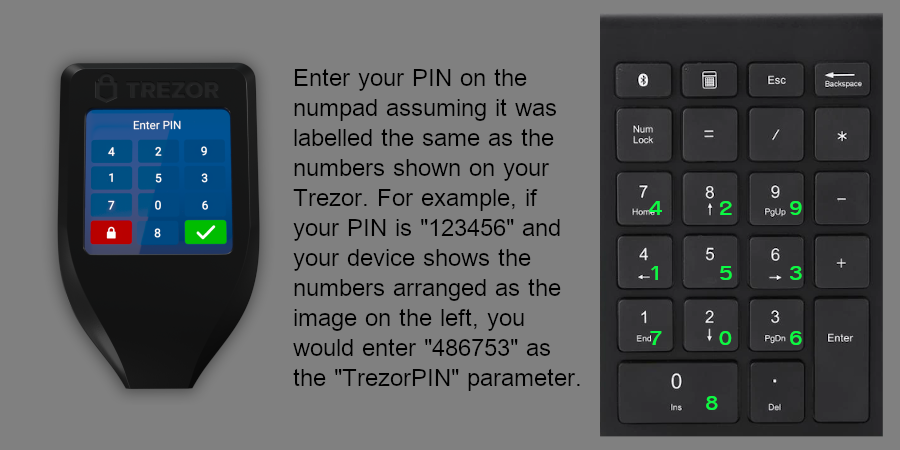
| user_action.pin | string (number) | When the Trezor device is displaying a grid of numbers for PIN entry, this param will contain your Trezor pin, as mapped through your keyboard numpad. See the image below for more information. |
# Response
| Parameter | Type | Description |
|---|---|---|
| result | string | The outcome of the request. |
# 📌 Examples
# Command
curl --url "http://127.0.0.1:7783" --data "{
    \"userpass\": \"YOUR_PASS\",
    \"mmrpc\": \"2.0\",
    \"method\": \"task::enable_utxo::user_action\",
    \"params\": {
        \"task_id\": 0,
        \"user_action\": {
            \"action_type\": \"TrezorPin\",
            \"pin\": \"862743\"
        }
    }
}"
# Response (success)
{
    "mmrpc":"2.0",
    "result":"success",
    "id":null
}
# task_enable_qtum_init
QTUM coins are activated using this method. For UTXO coins, refer to task::enable_utxo::init
# Arguments
| Parameter | Type | Description |
|---|---|---|
| ticker | string | The ticker of the coin you want to enable. |
| activation_params | object | An object containing the actvation parameters below. |
| .priv_key_policy | string | Defaults to ContextPrivkey. Set as Trezor to activate in Trezor mode. |
| .min_addresses_number | integer | How many additional addreesses to generate at a minimum. |
| .scan_policy | string | Whether or not to scan for new addresses. Select from do_not_scan, scan_if_new_wallet or scan. Note that scan will result in multple requests to the AtomicDEX-API. |
| .gap_limit | integer | The max number of empty addresses in a row. If transactions were sent to an address outside the gap_limit, they will not be identified when scanning. |
| .mode | object | An object containing RPC type and data parameters as below. |
| ..rpc | string | UTXO RPC mode. Options: { "rpc":"Native" } if running a native blockchain node, or "rpc":"Electrum" to use electrum RPCs. If using electrum, a list of electrum servers is required under rpc_data.servers |
| ..rpc_data | object | An object containing electrum server information. |
| ...servers | list | A list of electrum server URLs |
| ....url | object | The url and port of a coins electrum server |
| ....ws_url | object | Optional. Used to define electrum server url/port for websocket connections. |
| ....protocol | object | Defines electrum server protocol as TCP or SSL. Defaults to TCP |
| ....disable_cert_verification | boolean | Optional. For SSL electrum connections, this will allow expired certificates. |
# Response
| Parameter | Type | Description |
|---|---|---|
| task_id | integer | An identifying number which is used to query task status. |
# 📌 Examples
# Command
#!/bin/bash
source userpass
curl --url "http://127.0.0.1:7783" --data "{
    \"userpass\": \"$userpass\",
    \"mmrpc\": \"2.0\",
    \"method\": \"task::enable_qtum::init\",
    \"params\": {
        \"ticker\": \"QTUM\",
        \"activation_params\": {
            \"mode\": {
                \"rpc\": \"Electrum\",
                \"rpc_data\": {
                    \"servers\": [
                        {
                            \"url\": \"electrum2.cipig.net:10050\"
                        },
                        {
                            \"url\": \"electrum3.cipig.net:20050\",
                            \"ws_url\": \"electrum3.cipig.net:30050\",
                            \"protocol\": \"SSL\"
                        }
                    ]
                }
            },
            \"scan_policy\": \"scan_if_new_wallet\",
            \"priv_key_policy\": \"Trezor\",
            \"min_addresses_number\": 3,
            \"gap_limit\": 20
        }
    }
}"
# Response
{
    "mmrpc": "2.0",
    "result":{
        "task_id": 1
    },
    "id": null
}
# task_enable_qtum_status
After running the task::enable_qtum::init method, we can query the status of activation to check its progress.
The response will return the following:
- Result of the task (success or error)
- Progress status (what state the task is in)
- Required user action (what user should do before the task can continue)
# Arguments
| Parameter | Type | Description |
|---|---|---|
| task_id | integer | The identifying number returned when initiating the initialisation process. |
| forget_if_finished | boolean | If false, will return final response for completed tasks. Optional, defaults to true. |
# Request
curl --url "http://127.0.0.1:7783" --data "{
    \"userpass\": \"YOUR_PASS\",
    \"mmrpc\": \"2.0\",
    \"method\": \"task::enable_qtum::status\",
    \"params\": {
        \"task_id\": 0,
        \"forget_if_finished\": false
    }
}"
The response formats for this method are the same as the task::enable_utxo::status responses.
# task_enable_qtum_user_action
If the task::enable_qtum::status returns UserActionRequired, we need to use the task::enable_qtum::user_action method to enter our PIN
# Arguments
| Parameter | Type | Description |
|---|---|---|
| task_id | integer | The identifying number returned when initiating the initialisation process. |
| user_action | object | Object containing the params below |
| user_action.action_type | string | Will be TrezorPin for this method |
| user_action.pin | string (number) | When the Trezor device is displaying a grid of numbers for PIN entry, this param will contain your Trezor pin, as mapped through your keyboard numpad. See the image below for more information. |
# Response
| Parameter | Type | Description |
|---|---|---|
| result | string | The outcome of the request. |
# 📌 Examples
# Command
curl --url "http://127.0.0.1:7783" --data "{
    \"userpass\": \"YOUR_PASS\",
    \"mmrpc\": \"2.0\",
    \"method\": \"task::enable_qtum::user_action\",
    \"params\": {
        \"task_id\": 0,
        \"user_action\": {
            \"action_type\": \"TrezorPin\",
            \"pin\": \"862743\"
        }
    }
}"
# Response (success)
{
    "mmrpc":"2.0",
    "result":"success",
    "id":null
}
# Error Cases
CoinCreationError: Returned when a coin is not supported.
{
    "mmrpc": "2.0",
    "result": {
        "status": "Error",
        "details": {
            "error": "Error on platform coin QTUM creation: Coin doesn't support Trezor hardware wallet. Please consider adding the 'trezor_coin' field to the coins config",
            "error_path": "lib.init_qtum_activation.utxo_coin_builder",
            "error_trace": "lib:103] init_qtum_activation:71] utxo_coin_builder:234]",
            "error_type": "CoinCreationError",
            "error_data": {
                "ticker": "QTUM",
                "error": "Coin doesn't support Trezor hardware wallet. Please consider adding the 'trezor_coin' field to the coins config"
            }
        }
    },
    "id": null
}
# get_current_mtp
The get_current_mtp method returns the Median Time Past (MTP) from electrum servers for UTXO coins. This information is useful for debugging, specifically in cases where an electrum server has been misconfigured.
# Arguments
| Parameter | Type | Description |
|---|---|---|
| coin | string | A compatible (UTXO) coin's ticker |
| id | integer | Optional. Identifies a request to allow matching it with a response. Defaults to null |
# Response
| Parameter | Type | Description |
|---|---|---|
| mtp | integer | Unix timestamp |
| id | integer | Identifies a response to allow matching it with a request. Defaults to null if id not provided in request |
# 📌 Examples
# Command
curl --url "http://127.0.0.1:7783" --data "{
    \"method\": \"get_current_mtp\",
    \"userpass\": \"USERPASS\",
    \"mmrpc\": \"2.0\",
    \"id\": 42,
    \"params\": {
        \"coin\": \"RICK\"
    }
}
"
# Response (success)
{
    "mmrpc": "2.0",
    "result": {
        "mtp": 1658746383
    },
    "id": 42
}
# get_locked_amount
The get_locked_amount method returns the amount of a coin which is currently locked by a swap which is in progress. If the coin is not activated, a NoSuchCoin error will be returned.
# Arguments
| Parameter | Type | Description |
|---|---|---|
| coin | string | The ticker of the coin you want to query. |
# Response
| Parameter | Type | Description |
|---|---|---|
| coin | string | The ticker of the coin you queried. |
| locked_amount | object | An object cointaining the locked amount in decimal, fraction and rational formats. |
| locked_amount.decimal | numeric string | The locked amount in decimal format (opens new window). |
| locked_amount.rational | rational object | The locked amount in rational format. |
| locked_amount.fraction | fraction object | The locked amount in fraction format (opens new window). |
# 📌 Examples
# Command
curl --url "http://127.0.0.1:7783" --data "{
    \"userpass\": \"YOUR_PASS\",
    \"mmrpc\": \"2.0\",
    \"method\": \"get_locked_amount\",
    \"params\": {
        \"coin\": \"RICK\"
    },
  "id": 42
}"
# Response (success)
{
  "mmrpc": "2.0",
  "result": {
    "coin": "RICK",
    "locked_amount": {
      "decimal": "0.77803",
      "rational": [ [ 1, [ 77803 ] ], [ 1, [ 100000 ] ] ],
      "fraction": {
        "numer": "77803",
        "denom": "100000"
      }
    }
  },
  "id": 42
}
# Response (error)
{
  "mmrpc": "2.0",
  "error": "No such coin: TIME",
  "error_path": "lp_swap.lp_coins",
  "error_trace": "lp_swap:486] lp_coins:2894]",
  "error_type": "NoSuchCoin",
  "error_data": {
    "coin": "TIME"
  },
  "id": 42
}
# Heirarchical Deterministic Address Management
A hierarchical-deterministic (HD) wallet generates a new key pair from a master key pair, allowing for multiple addresses to be generated from the same seed so that change from transactions go to a previously unused address, enhancing privacy and security. The hierarchical structure resembles that of a tree, with the master key “determining” the key pairs that follow it in the hierarchy. If you have activated a coin with the task::enable_utxo::init or task::enable_qtum::init and used the "priv_key_policy": "Trezor" parameter, you can use the methods below to generate new addresses.
# can_get_new_address
To avoid generating too many addresses at once, we can use a gap_limit constraint so that no more than a specific amount of unused addresses can be generated before more addresses can be generated.
# Arguments
| Parameter | Type | Description |
|---|---|---|
| coin | string | The ticker of the coin you want to get a new address for |
| account_id | integer | Generally this will be 0 unless you have multiple accounts registered on your Trezor |
| chain | string | Internal, or External. External is used for addresses that are meant to be visible outside of the wallet (e.g. for receiving payments). Internal is used for addresses which are not meant to be visible outside of the wallet and is used for return transaction change. |
| gap_limit | integer | The maximum number of empty addresses in a row. |
# Response
| Parameter | Type | Description |
|---|---|---|
| result | string | Returns with value success when successful, otherwise returns the error values below |
| result.allowed | boolean | Whether or not you can get a new address. |
| result.reason | string | The reason you cant get a new address (if allowed is false). |
| result.details | object | Contains extra contextual information about the reason why allowed is false |
| result.details.address | boolean | If reason is LastAddressNotUsed, this is the address that should be used before you can get a new address. |
Other reasons you might not be able to get a new address are:
EmptyAddressesLimitReached- Last gap_limit addresses are still unused.AddressLimitReached- Addresses limit reached. Currently, the limit is 2^31 (opens new window)
# 📌 Examples
# Command
curl --url "http://127.0.0.1:7783" --data "{
    \"userpass\": \"YOUR_PASS\",
    \"mmrpc\": \"2.0\",
    \"method\": \"can_get_new_address\",
    \"params\": {
        \"coin\": \"RICK\",
        \"account_id\": 0,
        \"chain\": \"External\",
        \"gap_limit\": 20
    }
}"
# Response (success, allowed)
{
    "mmrpc": "2.0",
    "result": {
        "allowed": true
    },
    "id": null
}
# Response (success, not allowed)
{
    "mmrpc": "2.0",
    "result": {
        "allowed": false,
        "reason": "LastAddressNotUsed",
        "details": {
            "address": "RMHFCEWacWP7dYw1DWxH3TF5YW8q8hM5z7"
        }
    },
    "id": null
}
# get_new_address
If we don't already have too many unused addresses, we can use the get_new_address method to generate a new address. The generated address will be shown in account_balance and init_account_balance RPCs and on the next coin activation.
# Arguments
| Parameter | Type | Description |
|---|---|---|
| coin | string | The ticker of the coin you want to get a new address for |
| account_id | integer | Generally this will be 0 unless you have multiple accounts registered on your Trezor |
| chain | string | Internal, or External. External is used for addresses that are meant to be visible outside of the wallet (e.g. for receiving payments). Internal is used for addresses which are not meant to be visible outside of the wallet and is used for return transaction change. |
| gap_limit | integer | The maximum number of empty addresses in a row. |
# Response
| Parameter | Type | Description |
|---|---|---|
| result | string | Returns with value success when successful, otherwise returns the error values below |
| result.new_address | object | Contains details about your new address. |
| result.address | string | The new address that was generated. |
| result.details | object | Contains extra contextual information about the reason why allowed is false |
| result.details.address | boolean | If reason is LastAddressNotUsed, this is the address that should be used before you can get a new address. |
| result.details.derivation_path | string | The BIP44 derivation path (opens new window) of the address. |
| result.details.chain | string | External or Internal External is used for addresses that are meant to be visible outside of the wallet (e.g. for receiving payments). Internal is used for addresses which are not meant to be visible outside of the wallet and is used for return transaction change. |
| result.details.balance | object | Contains the spendable and unspendable balance for this address |
| result.details.balance.spendable | string(numeric) | Spendable balance for this address |
| result.details.balance.unspendable | string(numeric) | Unspendable balance for this address (e.g. from unconfirmed incoming transactions) |
Other reasons you might not be able to get a new address are:
EmptyAddressesLimitReached- Last gap_limit addresses are still unused.AddressLimitReached- Addresses limit reached. Currently, the limit is 2^31 (opens new window)
# 📌 Examples
# Command
curl --url "http://127.0.0.1:7783" --data "{
    \"userpass\": \"YOUR_PASS\",
    \"mmrpc\": \"2.0\",
    \"method\": \"get_new_address\",
    \"params\": {
        \"coin\": \"RICK\",
        \"account_id\": 0,
        \"chain\": \"External\",
        \"gap_limit\": 20
    }
}"
# Response (success)
{
    "mmrpc": "2.0",
    "result": {
        "allowed": true
    },
    "id": null
}
# Response (success, not allowed)
{
    "mmrpc": "2.0",
    "result": {
        "new_address": {
            "address": "RRqF4cYniMwYs66S4QDUUZ4GJQFQF69rBE",
            "derivation_path": "m/44'/141'/0'/0/3",
            "chain": "External",
            "balance": {
                "spendable": "0",
                "unspendable": "0"
            }
        }
    },
    "id": null
}
# HD Wallets Overview
The AtomicDEX API now is able to activate coins in Iguana and HW modes simultaneously!
For example, you can activate RICK with seed phrase private key like usual, and also activate MORTY with Hardware wallet at the same time.
To get started, configure and launch the AtomicDEX API, then plug in your Trezor hardware wallet device.
Initialisation and authentication:
- Initialise connection with your Trezor with task::init_trezor::init
- Check the status of the connecton with task::init_trezor::status
- Cancel authentication process with task::init_trezor::cancel
- Authenticate using PIN or phrase with task::init_trezor::user_action
UTXO Coin Activation in Hardware Mode:
- Use task::enable_utxo::init for UTXO coins like KMD, BTC and DOGE.
- Check the activation status with task::enable_utxo::status
- Authenticate the activation with task::enable_utxo::user_action
QTUM Coin Activation in Hardware Mode:
- Use task::enable_qtum::init for QTUM Ecosystem coins.
- Check the activation status with task::enable_qtum::status
- Authenticate the activation with task::enable_qtum::user_action
Withdrawing your Funds:
- Prepare a transaction with task::withdraw::init
- Check the status of the transaction preparation with task::withdraw::status
- Cancel the transaction preparation with task::withdraw::cancel
Viewing Hardware Wallet Coin Balances:
- Initialise the balance request with task::account_balance::init
- Check the status of the balance request with task::account_balance::status
Creating New Addresses:
- Use can_get_new_address to determine if your current address has been used, or should be updated.
- Use get_new_address to generate a new address
TIP
NOTE: These methods (and others with a task:: prefix) will be linked to a numeric task_id value which is used to query the status or outcome of the task.
# Details for HwError error type
When requesting the status of a task, if an error_type of HwError is returned, the GUI / User should check the details in error_data field to know which action is required (as detailed below).
FoundUnexpectedDevice- The connected Trezor device has a different pubkey value than what was specified in thedevice_pubkeyparameter
{
    "mmrpc": "2.0",
    "result": {
        "status": "Error",
        "details": {
            "error": "Found unexpected device. Please re-initialize Hardware wallet",
            "error_path": "lib.common_impl.coin_balance.utxo_common.hd_pubkey.hw_ctx",
            "error_trace": "lib:93] common_impl:46] coin_balance:304] utxo_common:163] hd_pubkey:176] hw_ctx:149]",
            "error_type": "HwError",
            "error_data": "FoundUnexpectedDevice"
        }
    },
    "id": null
}
FoundMultipleDevices- Multiple Trezor devices are plugged in. Remove the additional devices, and keep the one you want to use plugged in.
{
  "mmrpc": "2.0",
  "result": {
    "status": "Error",
    "details": {
      "error": "Found multiple devices. Please unplug unused devices",
      "error_path": "init_hw.crypto_ctx.hw_client",
      "error_trace": "init_hw:151] crypto_ctx:248] crypto_ctx:354] hw_client:152] hw_client:126]",
      "error_type": "HwError",
      "error_data": "FoundMultipleDevices"
    }
  },
  "id": null
}
NoTrezorDeviceAvailable- No Trezor device detected by the AtomicDEX API. Make sure it is plugged in, or try a different USB cable / port.
{
    "mmrpc": "2.0",
    "result": {
        "status": "Error",
        "details": {
            "error": "No Trezor device available",
            "error_path": "init_hw.crypto_ctx.hw_ctx.response.usb.libusb",
            "error_trace": "init_hw:151] crypto_ctx:248] crypto_ctx:354] hw_ctx:120] response:136] usb:46] libusb:195]",
            "error_type": "HwError",
            "error_data": "NoTrezorDeviceAvailable"
        }
    },
    "id": null
}
# max_maker_vol
The max_maker_vol method returns the maximum volume of a coin which can be used to create a maker order (taking into account estimated fees). If the coin is not activated, a NoSuchCoin error will be returned.
# Arguments
| Parameter | Type | Description |
|---|---|---|
| coin | string | The ticker of the coin you want to query. |
# Response
| Parameter | Type | Description |
|---|---|---|
| coin | string | The ticker of the coin you queried. |
| volume | object | An object cointaining the tradable maker volume in decimal, fraction and rational formats. |
| volume.decimal | numeric string | The tradable maker volume in decimal format (opens new window). |
| volume.rational | rational object | The tradable maker volume in rational format. |
| volume.fraction | fraction object | The tradable maker volume in fraction format (opens new window). |
| balance | object | An object cointaining the locked amount in decimal, fraction and rational formats. |
| balance.decimal | numeric string | The coin balance in decimal format (opens new window). |
| balance.rational | rational object | The coin balance in rational format. |
| balance.fraction | fraction object | The coin balance in fraction format (opens new window). |
| locked_by_swaps | object | An object cointaining the volume of a coin's balance which is locked by swaps in progress in decimal, fraction and rational formats. |
| locked_by_swaps.decimal | numeric string | The locked by swaps amount in decimal format (opens new window). |
| locked_by_swaps.rational | rational object | The locked by swaps amount in rational format. |
| locked_by_swaps.fraction | fraction object | The locked by swaps amount in fraction format (opens new window). |
# 📌 Examples
# Command
curl --url "http://127.0.0.1:7783" --data "{
  \"userpass\": \"YOUR_RPCPASSWORD\",
  \"mmrpc\": \"2.0\",
  \"method\": \"max_maker_vol\",
  \"params\": {
    \"coin\": \"RICK\"
  }
}"
# Response (success)
{
  "mmrpc": "2.0",
  "result": {
    "coin": "MORTY",
    "volume": {
      "decimal": "4.489763268712998712998712998712998712998712998712998712998712998712998712998712998712998712998712999",
      "rational": [
        [1, [962255003, 81]],
        [1, [390588672, 18]]
      ],
      "fraction": {
        "numer": "348854605979",
        "denom": "77700000000"
      }
    },
    "balance": {
      "decimal": "5.49110027",
      "rational": [
        [1, [549110027]],
        [1, [100000000]]
      ],
      "fraction": {
        "numer": "549110027",
        "denom": "100000000"
      }
    },
    "locked_by_swaps": {
      "decimal": "1.001317001287001287001287001287001287001287001287001287001287001287001287001287001287001287001287001",
      "rational": [
        [1, [77802331]],
        [1, [77700000]]
      ],
      "fraction": {
        "numer": "77802331",
        "denom": "77700000"
      }
    }
  },
  "id": null
}
# Response (error)
{
  "mmrpc": "2.0",
  "error": "No such coin TIME",
  "error_path": "max_maker_vol_rpc.lp_coins",
  "error_trace": "max_maker_vol_rpc:140] lp_coins:2894]",
  "error_type": "NoSuchCoin",
  "error_data": {
    "coin": "TIME"
  },
  "id": null
}
# Response (balance too low)
{
    "mmrpc": "2.0",
    "error": "Not enough QTUM for swap: available 0, required at least 0.000728, locked by swaps None",
    "error_path": "max_maker_vol_rpc.maker_swap.utxo_common",
    "error_trace": "max_maker_vol_rpc:148] maker_swap:2203] utxo_common:3327] utxo_common:892]",
    "error_type": "NotSufficientBalance",
    "error_data": {
        "coin": "QTUM",
        "available": "0",
        "required": "0.000728"
    },
    "id": null
}
# Response (Transport error)
{
  "mmrpc": "2.0",
  "error": "Transport error: JsonRpcError { client_info: 'coin: tBTC', request: JsonRpcRequest { jsonrpc: '2.0', id: '31', method: 'blockchain.estimatefee', params: [Number(1), String('ECONOMICAL')] }, error: Transport('rpc_clients:1237] rpc_clients:1239] ['rpc_clients:2047] common:1385] future timed out']') }",
  "error_path": "taker_swap.utxo_common",
  "error_trace": "taker_swap:1599] utxo_common:1990] utxo_common:166]",
  "error_type": "Transport",
  "error_data": "JsonRpcError { client_info: 'coin: tBTC', request: JsonRpcRequest { jsonrpc: '2.0', id: '31', method: 'blockchain.estimatefee', params: [Number(1), String('ECONOMICAL')] }, error: Transport('rpc_clients:1237] rpc_clients:1239] ['rpc_clients:2047] common:1385] future timed out']') }",
  "id": 0
}
# AtomicDEX API RPC Protocol v2.0 (Dev)
Starting with version beta-2.1.3434 (opens new window), the AtomicDEX API supports the standardized protocol format called mmrpc 2.0.
It includes a uniform request, successful and error response formats. At the moment, only a few RPC methods support the mmrpc 2.0 protocol.
# Request
| Structure | Type | Description |
|---|---|---|
| mmrpc | string | the string specifying the version of the AtomicDEX API RPC protocol. Must be exactly "2.0" |
| userpass | string (optional) | your password for protected RPC methods. Skip this field if the specified method is public |
| method | string | the name of the method to be invoked |
| params | object (optional) | a structured value that holds the parameter values to be used during the invocation of the method. This field may be omitted if the method doesn't take arguments |
| id | number (optional) | the identifier is established by the client. AtomicDEX API will reply with the same value in the Response object if the id field is included and not NULL |
# Response (Success)
| Structure | Type | Description |
|---|---|---|
| mmrpc | string | the string specifying the version of the AtomicDEX API RPC protocol |
| result | object | the value of this field is determined by the method invoked on AtomicDEX API |
| id | number (optional) | the identifier established by the client. The same value as in the Request if it was passed |
# Response (Error)
| Structure | Type | Description |
|---|---|---|
| mmrpc | string | the string specifying the version of the AtomicDEX API RPC protocol |
| error | string | the common error description |
| error_path | string | the error path consisting of file names separated by a dot similar to JSON path notation |
| error_trace | string | the error path consisting of file and line number pairs separated by ']' |
| error_type | string | the string error identifier used to determine the cause of the error |
| error_data | object | an object containing the error data of the corresponding error_type |
| id | number (optional) | the identifier established by the client. The same value as in the Request if it was passed |
# 📌 Examples
# Command
curl --url "http://127.0.0.1:7783" --data "{\"mmrpc\":\"2.0\",\"userpass\":\"$userpass\",\"method\":\"withdraw\",\"params\":{\"coin\":\"KMD\",\"to\":\"RJTYiYeJ8eVvJ53n2YbrVmxWNNMVZjDGLh\",\"amount\":\"10\"},\"id\":0}"
# Response (success)
{
  "mmrpc": "2.0",
  "result": {
    "tx_hex": "0400008085202f8901ef25b1b7417fe7693097918ff90e90bba1351fff1f3a24cb51a9b45c5636e57e010000006b483045022100b05c870fcd149513d07b156e150a22e3e47fab4bb4776b5c2c1b9fc034a80b8f022038b1bf5b6dad923e4fb1c96e2c7345765ff09984de12bbb40b999b88b628c0f9012102031d4256c4bc9f99ac88bf3dba21773132281f65f9bf23a59928bce08961e2f3ffffffff0200e1f505000000001976a91405aab5342166f8594baf17a7d9bef5d56744332788ac8cbaae5f010000001976a91405aab5342166f8594baf17a7d9bef5d56744332788ace87a5e5d000000000000000000000000000000",
    "tx_hash": "1ab3bc9308695960bc728fa427ac00d1812c4ae89aaa714c7618cb96d111be58",
    "from": ["R9o9xTocqr6CeEDGDH6mEYpwLoMz6jNjMW"],
    "to": ["R9o9xTocqr6CeEDGDH6mEYpwLoMz6jNjMW"],
    "total_amount": "60.10253836",
    "spent_by_me": "60.10253836",
    "received_by_me": "60.00253836",
    "my_balance_change": "-0.1",
    "block_height": 0,
    "timestamp": 1566472936,
    "fee_details": {
      "type": "Utxo",
      "amount": "0.1"
    },
    "coin": "RICK",
    "internal_id": ""
  },
  "id": 0
}
# Response (error)
{
  "mmrpc": "2.0",
  "error": "The amount 0.000005 is too small",
  "error_path": "utxo_common",
  "error_trace": "utxo_common:1379] utxo_common:301]",
  "error_type": "AmountIsTooSmall",
  "error_data": {
    "amount": "0.000005"
  },
  "id": 0
}
# Trezor Initialisation
The methods below prepare your Trezor device for use within the AtomicDEX API. Once completed, you can authenticate using your PIN or phrase with task::init_trezor::user_action.
# task_init_trezor_init
Before using this method, launch the AtomicDEX API, and plug in your Trezor.
# Arguments
| Parameter | Type | Description |
|---|---|---|
| device_pubkey | string | Optional. If known, you can specify the device pubkey. If not known, this will be part of the task::init_trezor::status response which you can save for future use |
# Response
| Parameter | Type | Description |
|---|---|---|
| task_id | integer | An identifying number which is used to query task status. |
# 📌 Examples
# Command (without device_pubkey)
curl --url "http://127.0.0.1:7783" --data "{
    \"userpass\": \"YOUR_PASS\",
    \"mmrpc\": \"2.0\",
    \"method\": \"task::init_trezor::init\",
    \"params\": {}
}"
# Command (with device_pubkey)
curl --url "http://127.0.0.1:7783" --data "{
    \"userpass\": \"YOUR_PASS\",
    \"mmrpc\": \"2.0\",
    \"method\": \"task::init_trezor::init\",
    \"params\": {
        \"device_pubkey\": \"066deb87b0d0500ec2e9b85f5314870b03a53517\"
    }
}"
# Response (success)
{
    "mmrpc": "2.0",
    "result":{
        "task_id": 0
    },
    "id": null
}
# task_init_trezor_status
After running the task::init_trezor::init method, we can query the status of device initialisation to check its progress.
# Arguments
| Parameter | Type | Description |
|---|---|---|
| task_id | integer | The identifying number returned when initiating the initialisation process. |
| forget_if_finished | boolean | If false, will return final response for completed tasks. Optional, defaults to true. |
# Response
| Parameter | Type | Description |
|---|---|---|
| status | string | A short indication of how the requested process is progressing. |
| details | object | Depending on the state of process progress, this will contain different information as detailed in the items below. |
| details.type | string | Type of hardware wallet device (e.g. Trezor) |
| details.model | string | The model of the hardware wallet device (e.g. One or T) |
| details.device_name | string | The name of the device as defned by user in Trezor Suite or another wallet application. |
| details.device_id | string (hex) | An unique identifier of the device, set during manufacturing. |
| details.device_pubkey | string (hex) | The hardware wallet device's pubkey. If included in the task::init_trezor::init request, it wll be the same as input. If not, it should be stored for future use. |
# 📌 Examples
# Command
curl --url "http://127.0.0.1:7783" --data "{
    \"userpass\": \"YOUR_PASS\",
    \"mmrpc\": \"2.0\",
    \"method\": \"task::init_trezor::status\",
    \"params\": {
        \"task_id\": 0,
        \"forget_if_finished\": false
    }
}"
# Response (in progress)
Possible "In progress" Cases:
Initializing- This is the normal task state. It does not require any action from the user.WaitingForTrezorToConnect- The AtomicDEX API is waiting for the user to plugin a Trezor device.
{
    "mmrpc": "2.0",
    "result": {
        "status": "InProgress",
        "details": "WaitingForTrezorToConnect"
    },
    "id": null
}
FollowHwDeviceInstructions- The AtomicDEX API is waiting for the user to follow instructions displayed on the device (e.g. clicking a button to confirm).
{
    "mmrpc": "2.0",
    "result": {
        "status": "InProgress",
        "details": "FollowHwDeviceInstructions"
    },
    "id": null
}
UserActionRequired- This will either beEnterTrezorPinorEnterTrezorPassphrase. Refer to the task::init_trezor::user_action section for more information.
{
    "mmrpc": "2.0",
    "result": {
        "status": "UserActionRequired",
        "details": "EnterTrezorPin"
    },
    "id": null
}
# Response (ready, successful)
{
    "mmrpc": "2.0",
    "result": {
        "status": "Ok",
        "details": {
            "result": {
                "type": "Trezor",
                "model": "One",
                "device_name": "Fitzchivalry Farseer",
                "device_id": "A1CCF11243A795A84111955E",
                "device_pubkey": "066deb87b0d0500ec2e9b85f5314870b03a53517"
            }
        }
    },
    "id": null
}
# Error Responses (by error_type)
:
HwContextInitializingAlready- Returned if user callstask::init_trezor::initbefore the previoustask::init_trezor::inittask has been completed.
{
    "mmrpc": "2.0",
    "result": {
        "status": "Error",
        "details": {
            "error": "Hardware Wallet context is initializing already",
            "error_path": "init_hw.crypto_ctx",
            "error_trace": "init_hw:151] crypto_ctx:235]",
            "error_type": "HwContextInitializingAlready"
        }
    },
    "id": null
}
Timeout- Task timed out while trying to connect to a device.
{
    "mmrpc": "2.0",
    "result": {
        "status": "Error",
        "details": {
            "error": "RPC timed out 300s",
            "error_path": "init_hw.crypto_ctx.hw_client",
            "error_trace": "init_hw:151] crypto_ctx:248] crypto_ctx:354] hw_client:156]",
            "error_type": "Timeout",
            "error_data": {
                "secs": 300,
                "nanos": 0
            }
        }
    },
    "id": null
}
NoSuchTask- Something went wrong ortask::init_trezor::initwas not called. Refer to the task::init_trezor::init section for more information.
{
  "mmrpc": "2.0",
  "error": "No such task '0'",
  "error_path": "init_hw",
  "error_trace": "init_hw:184]",
  "error_type": "NoSuchTask",
  "error_data": 0,
  "id": null
}
HwError- This is the most important error type. Unlike other error types,HwErrorrequires the GUI / User to check the details inerror_datafield to know which action is required. View the HwError error type details for more info.
# task_init_trezor_cancel
Use the task::init_trezor::cancel method to cancel the initialisation task.
# Arguments
| Parameter | Type | Description |
|---|---|---|
| task_id | integer | The identifying number returned when initiating the initialisation process. |
# Response
| Parameter | Type | Description |
|---|---|---|
| result | string | Returns with value success when successful, otherwise returns the error values below |
| error | string | Description of the error |
| error_path | string | Used for debugging. A reference to the function in code base which returned the error |
| error_trace | string | Used for debugging. A trace of lines of code which led to the returned error |
| error_type | string | An enumerated error identifier to indicate the category of error |
| error_data | string | Additonal context for the error type |
# 📌 Examples
# Command
curl --url "http://127.0.0.1:7783" --data "{
    \"userpass\": \"YOUR_PASS\",
    \"mmrpc\": \"2.0\",
    \"method\": \"task::init_trezor::cancel\",
    \"params\": {
        \"task_id\": 0
    }
}"
# Response (ready, successful)
{
    "mmrpc": "2.0",
    "result": "success",
    "id": null
}
# Response (error, task already finished)
{
    "mmrpc": "2.0",
    "error": "Task is finished already",
    "error_path": "init_hw.manager",
    "error_trace": "init_hw:209] manager:104]",
    "error_type": "TaskFinished",
    "error_data": 0,
    "id": null
}
# task_init_trezor_user_action
When you see the pin grid on your device, or it asks for a passphrase word, use this method.
# Arguments
| Parameter | Type | Description |
|---|---|---|
| task_id | integer | The identifying number returned when initiating the initialisation process. |
| user_action | object | Object containing the params below |
| user_action.action_type | string | Either TrezorPin or TrezorPassphrase, depending on which is requested by responses from related methods returning "status": "UserActionRequired" |
| user_action.pin | string (number) | When the Trezor device is displaying a grid of numbers for PIN entry, this param will contain your Trezor pin, as mapped through your keyboard numpad. See the image below for more information. |
| user_action.passphrase | string | The passphrase (opens new window) functions like an extra word added to your recovery seed, and it used to access hidden wallets. To access the default wallet, input an empty string here. |
# Response
| Parameter | Type | Description |
|---|---|---|
| result | string | The outcome of the request. |
TIP
NOTE: Even an incorrect PIN will return success. This doesn't mean the PIN was accepted, just that it was communicated without errors. If the PIN was incorrect, you will see an error like below in the next response for a method that requires authentication.
{
    "mmrpc": "2.0",
    "result": {
        "status": "Error",
        "details": {
            "error": "Error on platform coin KMD creation: Hardware Wallet context is not initialized",
            "error_path": "lib.init_utxo_standard_activation.utxo_coin_builder",
            "error_trace": "lib:103] init_utxo_standard_activation:79] utxo_coin_builder:317]",
            "error_type": "CoinCreationError",
            "error_data": {
                "ticker":"KMD",
                "error":"Hardware Wallet context is not initialized"
            }
        }
    },
    "id": null
}
# 📌 Examples
# Command (for TrezorPin)
curl --url "http://127.0.0.1:7783" --data "{
    \"userpass\": \"YOUR_PASS\",
    \"mmrpc\": \"2.0\",
    \"method\": \"task::init_trezor::user_action\",
    \"params\": {
        \"task_id\": 0,
        \"user_action\": {
            \"action_type\": \"TrezorPin\",
            \"pin\": \"862743\"
        }
    }
}"
# Command (for TrezorPassphrase)
curl --url "http://127.0.0.1:7783" --data "{
    \"userpass\": \"YOUR_PASS\",
    \"mmrpc\": \"2.0\",
    \"method\": \"task::init_trezor::user_action\",
    \"params\": {
        \"task_id\": 0,
        \"user_action\": {
            \"action_type\": \"TrezorPassphrase\",
            \"passphrase\": \"breakfast\"
        }
    }
}"
# Response (success)
{
    "mmrpc":"2.0",
    "result":"success",
    "id":null
}
# Withdraw Tasks
# task_withdraw_init
The task::withdraw::init method generates and signs transaction which will transfer the amount of coin to the address indicated in the to argument. The status of this method can be queried via the withdraw_status method, or .
It will return the transaction hex (via task::withdraw::status), which then needs to be broadcast with the sendrawtransaction to complete the withdrawal. This method is uses the same input fields as the standard v2 withdraw method, with additional optional fields to specify the from address when using a hardware or HD wallet. There are two way to indicate which HW/HD address to send funds from:
- Using
derivation_pathas a single input. E.gm/44'/20'/0'/0/2 - Using
account_id(0),chain(External) &address_id(2) inputs. The bracketed values are the equavalent of the derivation path above.
To cancel the transaction generation, use the withdraw_cancel method.
TIP
When used for ZHTLC coins like ARRR or ZOMBIE, it may take some time to complete.
# Arguments
| Structure | Type | Description |
|---|---|---|
| coin | string | The name of the coin the user desires to withdraw |
| to | string | Coins are withdrawn to this address |
| amount | string (numeric) | The amount the user desires to withdraw, ignored when max=true |
| memo | string | Optional, used for ZHTLC and Tendermint coins only. Attaches a memo to the transaction. |
| from | string | Optional, used only for transactions using a hardware or HD wallet. |
| from.derivation_path | string | Optional, HW/HD wallets only. Follows the format m/44'/COIN_ID'/ACCOUNT_ID'/CHAIN/ADDRESS_ID |
| from.account_id | integer | Optional, HW/HD wallets only. Generally this will be 0 unless you have multiple accounts registered on your HW/HD wallet |
| from.chain | string | Optional, HW/HD wallets only. Internal, or External. External is used for addresses that are meant to be visible outside of the wallet (e.g. for receiving payments). Internal is used for addresses which are not meant to be visible outside of the wallet and is used for return transaction change. |
| from.address_id | integer | Optional, HW/HD wallets only. Check the output from coin activation to find the ID of an address with balance. |
| max | bool | Optional. Withdraw the maximum available amount. Defaults to false |
| fee | object | Optional. Used only to set a custom fee, otherwise fee value will be derived from a deamon's estimatefee (or similar) RPC method |
| fee.type | string | Type of transaction fee; possible values: UtxoFixed or UtxoPerKbyte |
| fee.amount | string (numeric) | Fee amount in coin units, used only when type is UtxoFixed (fixed amount not depending on tx size) or UtxoPerKbyte (amount per Kbyte) |
# Response
| Structure | Type | Description |
|---|---|---|
| task_id | integer | An identifying number which is used to query task status. |
# 📌 Examples
# Command
#!/bin/bash
source userpass
curl --url "http://127.0.0.1:7783" --data "{
    \"mmrpc\": \"2.0\",
    \"userpass\": \"${userpass}\",
    \"method\": \"task::withdraw::init\",
    \"params\": {
        \"coin\": \"COIN_NAME\",
        \"to\": \"RECIPIENT_ADDRESS\",
        \"amount\": \"AMOUNT\"
    },
    \"id\": 0
}"
# Command (max = true)
#!/bin/bash
source userpass
curl --url "http://127.0.0.1:7783" --data "{
    \"mmrpc\": \"2.0\",
    \"userpass\": \"${userpass}\",
    \"method\": \"task::withdraw::init\",
    \"params\": {
        \"coin\": \"COIN_NAME\",
        \"to\": \"RECIPIENT_ADDRESS\",
        \"max\": true
    },
    \"id\": 0
}"
# Command (custom UtxoFixed fee)
#!/bin/bash
source userpass
curl --url "http://127.0.0.1:7783" --data "{
    \"mmrpc\": \"2.0\",
    \"userpass\": \"${userpass}\",
    \"method\": \"task::withdraw::init\",
    \"params\": {
        \"coin\": \"COIN_NAME\",
        \"to\": \"RECIPIENT_ADDRESS\",
        \"amount\": \"AMOUNT\",
        \"fee\": {
            \"type\":\"UtxoFixed\",
             \"amount\":\"0.001\"
         }
    },
    \"id\": 0
}"
# Command (custom UtxoPerKbyte fee)
#!/bin/bash
source userpass
curl --url "http://127.0.0.1:7783" --data "{
    \"mmrpc\": \"2.0\",
    \"userpass\": \"${userpass}\",
    \"method\": \"task::withdraw::init\",
    \"params\": {
        \"coin\": \"COIN_NAME\",
        \"to\": \"RECIPIENT_ADDRESS\",
        \"amount\": \"AMOUNT\",
        \"fee\": {
            \"type\":\"UtxoPerKbyte\",
             \"amount\":\"0.00097\"
         }
    },
    \"id\": 0
}"
# Command (HW/HD wallet: derivation path option)
curl --url "http://127.0.0.1:7783" --data "{
    \"userpass\": \"$userpass\",
    \"mmrpc\": \"2.0\",
    \"method\": \"task::withdraw::init\",
    \"params\": {
        \"coin\": \"COIN_NAME\",
        \"to\": \"ADDRESS_OF_RECIPIENT\",
        \"amount\": AMOUNT_TO_SEND,
        \"from\": {
            \"derivation_path\": \"DERIVATION_PATH\"
        }
    }
}"
# Command (HW/HD wallet: account_id, chain & address_id option)
curl --url "http://127.0.0.1:7783" --data "{
    \"userpass\": \"$userpass\",
    \"mmrpc\": \"2.0\",
    \"method\": \"task::withdraw::init\",
    \"params\": {
        \"coin\": \"COIN_NAME\",
        \"to\": \"ADDRESS_OF_RECIPIENT\",
        \"amount\": AMOUNT_TO_SEND,
        \"from\": {
            \"account_id\": 0,
            \"chain\": \"External\",
            \"address_id\": ADDRESS_ID
        }
    }
}"
# Response
{
  "mmrpc": "2.0",
  "result": {
    "task_id": 6
  },
  "id": null
}
# task_withdraw_status
To get the status of your withdrawal transaction generation, use the task::withdraw::status method. Once ready, it will provide the raw hex used to broadcast your transaction with sendrawtransaction. The response returned is the same as what is returned from the standard v2 withdraw method
# Arguments
| Parameter | Type | Description |
|---|---|---|
| task_id | integer | The identifying number returned when initiating the initialisation process. |
| forget_if_finished | boolean | If false, will return final response for completed tasks. Optional, defaults to true |
# Response
| Structure | Type | Description |
|---|---|---|
| status | string | A short indication of how the withdrawal is progressing. |
| details | object | Depending on the state of withdrawal progress, this will contain different information as shown in the responses below. |
| details.coin | string | The ticker of the coin to be withdrawn. |
| details.to | array of strings | Coins are withdrawn to these addresses; this may contain the my_address address, where change from UTXO coins is sent. |
| details.from | array of strings | Coins are withdrawn from this address; the array contains a single element, but transactions may be sent from several addresses (UTXO coins) |
| details.my_balance_change | string (numeric) | The expected balance of change in my_address after the transaction broadcasts. |
| details.received_by_me | string (numeric) | The amount of coins received by my_address after the transaction broadcasts; the value may be above zero when the transaction requires that the AtomicDEX API send change to my_address |
| details.spent_by_me | string (numeric) | The amount of coins spent by my_address. This value differ from the request amount, as the transaction fee is taken into account. |
| details.total_amount | string (numeric) | The total amount of coins transferred. |
| details.fee_details | object | The fee details of the generated transaction. fee_details.type is "Utxo" for Z coins. fee_details.coin will be the same as details.coin, and fee_details.amount will be a numeric value. |
| details.tx_hash | string | The hash of the generated transaction. |
| details.tx_hex | string | Transaction bytes in hexadecimal format. Use this value as input for the send_raw_transaction method. |
| details.transaction_type | string | A value to indicate the type of transaction. Most often this will be StandardTransfer. |
| details.kmd_rewards | object (optional) | If supported (e.g. when withdrawing KMD), an object containing information about accrued rewards. |
| details.kmd_rewards.amount | string (numeric, optional) | The amount of accrued rewards |
| details.kmd_rewards.claimed_by_me | bool (optional) | Whether or not the rewards been claimed by me. |
# 📌 Examples
# Command
#!/bin/bash
source userpass
curl --url "http://127.0.0.1:7783" --data "{
    \"mmrpc\": \"2.0\",
    \"userpass\": \"$userpass\",
    \"method\": \"task::withdraw::status\",
    \"params\": {
        \"task_id\": TASK_ID,
        \"forget_if_finished\": false
    },
    \"id\":0
}"
# Response (Generating transaction)
{
    "mmrpc": "2.0",
    "result": {
        "status": "InProgress",
        "details": "GeneratingTransaction"
    },
    "id":0
}
# Response (Generating ZHTLC transaction complete)
{
    "mmrpc": "2.0",
    "result": {
        "status": "Ok",
        "details": {
            "tx_hex": "0400008085202f8900000000000056390400e803000000000000017aef9bb6fda6cff496046976f57dea0848fc05a46ce948dd1dab7d551a5e5a5cdc41b3409adec489e1c4ffb33bfca7a949833fadfb7cc93546aab96a8bffca469bbd435682f5af367ab07dbbbecc448010e056103fa236251b2b74d4f43d031d43df8e32672e99dae0ee51ece01c523b7ce7fb9aa8682e23e122d732a67664d3822b04edd1a12ed586b1e7dcef08c4f870792eccc2ad74a48da134a9368adb5967b01681fd1d617c2ce972f5860f976cb828363b9501f167d99e8ac17422a54e055cbfc7fce40e95b4de7bb0c8fa9e61f8a0ec07f23a28a7c4897fa6fe372a2e0fb8a2706b71db38648782eac18529d7bbcb5fe42b9da26fb2adf050538bd21c42aecbad0626ad4f4094c337ff3e9cf19292c1f0cc37b0e506231647573fb9ba479675ed99471b7fad4e54213c98facb47af6851e182ee7142a86cfd80a7741bdbeab8a1a6b093c1c093599165c8a8e7ae43c47b87b97fb7363bebc34df4fc2a045c04f850d5bc693f481ab0028706c673fad02a93c3e8e170e08f438034a600027a2974f846c278dce35d564e4c0d5de17c341fbe97d0048b4129c7dc81c4a0172e0986a5568d240fb50c9dc746e5398603aaec588835165e17162f218b71e55bf1403e4d1b81a8c745c7e87571f6c62966154a10ae908293bc66270d8ebc8d835498c7bfd379f87a57babe18db1e379a2fdb4c7413915015b23a54cf6ea2344bbd4f7abbaaec007427c69be51ea7f696ac94741305860ced9cfe96a1cf6bfbbaa182769bc6c8a74169c52990ee27accb51835766397183f408cd6679ccb04ddfc957bedea7fd2dd81103425f886566658b99baf9e0b7c353c5b19a84fece3f35d3902406b1757149f89cab9fe1301bd03d6e3994f617d0bb8b7706b946a15deb2afa0e42e2b8f15f758c6909a51d3ace11fb465e1ed34986f728568088ca75b20b29e924f561534dd38a54ca79ddc318b06f4d2d9a107ecd7601caa3b766d435ad7099e1aff7a0e64f3dbf9500c4f8274b16a1a76858187cebcbde43c8fc30955ff09f0d2930fbcc54f2b931d76e7924f58dbe181a04c22dc8729cf04d0b939206b62f8abbb07bdeedc65086b0c1703570130f928427ff0b6d605c1760be7d32f6343d0c871575f88785c36db39133cf7ce40a712681baaa299706a69d816a24bb8009c4a900021e91530a952eb4dbf036f29cb7e7788665d7318e9486ae99c9ca0d108134fb79588e73bca79cf34cb50ccfdcfef6154f8a399c87dc212eb29961b7bb61454f455b0ff03b3a57cfaacafb437a9341c0fa1c107c27a065716c9de69c129557e35f6af63312f25138174c020c9754d57c45066e28b0d70d77ceef1f69a4c55ce7a33a4120924fb08207018da848bdc4f4e44fbfe0889ba9cd3741ca565516e34cbb260b3870927310d99059c2651ee645b7d9f755e59a9c3821a4d576d7f5b5db22a9befa3163189b09124789897bde57d662d3c7e25d99d709ffdc803acbb8fde2a93dca1525bb1123ed661f8c58113a7e6d1eeb04f738f31bf80ef687804c32de4ca82ae0c3100533e498d9551618b91424489d31526ea46f78d93aa8eef2a25cf53b83cad226d17ba92dc55366a011c494c7f7b9a9c4e1ac6c41fa96f03a66a402d6e6b1b864e8b640ec44bcaf0c00f5ed093823f0a10749708f69377cab25b393a4251f2b605e8022bbfc8c9832c31a5e98d7730042644b56507e00bc24ecf4979fa22e1b40bed2246f38baf715d25a38e400386847997adaf71fe50d29da6995bd50760b08faeec9360147d68175c7cc81be238b406b1e1d414f142a8053e119b2d1ee508fe510d2adad21bd4dff33f6400f17ef88055992b3335fb2a19836b1df3c7ac5ef1a342c9eadb69202d06bfe25ee84625cec62cf507caa2f5b7de8ccdc85921dbdc09e885ad2a7b1f86a6963086073d33f25fd5281f879e1b01d4422048a9a11d6fb6da1d457dd0f9583e38edc4cb4d0c7a7049fd7821c6ccf86160c3d2e4afba86cf154cabf3e8766607d017e348a15b576347e2fdc6742093b8635c0cb0a22835df10f93859875b36cffd1dcb23c6ea95542c9f3c9b5afe613438347b753af37d955dbbe169733beaaff57f1fc685e8c43abb3aaa4bbc4af0211677d87c7d7bcb69631acecd93110b572f3508ff49a0d64f3bd7c01c60cdfd45b01165e3682e8d68f614b523cc73d1a402d650bca867e5bc09c9a920ac8adf8c502db88da0579087e93125836b6398790dc3cba5c1dcfec974d58bf22a9fbc10ca63d5116da35e15eb149d85aa58de15784cfc2574cbc8c7cf81c0f44ea250925e176d2010f7864a393e43da8349dcaf26d7814d7da07d2069a1ee7bd6184351dfc8ae28757d65d15347eae69e9fac8453e1dc6506f4db9aa22db3f35b1782f7b43b1b85e6e0f8ac772712a044e5ef90235eb79ff83a7723ff78a7bba1381ada81507480ac1f0eca939061891b41c1b25aba3172916c3bab939d9f3baec391b2d503be7f63b44dd0fefd5ba769f2f699923531a7bf3a50079133dba31ff3c13b925e6e678b45e217c7ed0c328c15e36ebc56f2cd8c5e7961dadc99f42fe9a0a7d13e849308bcbd760f9570e821db1ea13d3f65ade8b50d3b9b95d2c0eb3e6b8b9796daa4ad0e1ab9dc6585a2dcf1d189e86c7698657f2684df36f31b5e955f9dd044dd3fd174fafcb814da305d15bfed40b4746875abe999bbfc97c58a24ba383dc7c4bb098e09df55f1ed05bbc3f3e0ea510d7dcfc01b1386a6e376c41879a77427e16cb7a0263b635c99713cfa95794cf7b5717836be632c1434970875f9b5c7886d0237f88c509b08a55981259fa08823bd455febd12ee3e5c6e41f66057a3039946052545694ada38babc3f421a531d90cd80461674e4b8efc0ada6a349e56fd12a60f083cce4169170e4a3bb1aeb7193c8b7f686f88240bda72e8fe682c1ad955689a9de678e143e67e04eefd18d86020829eb7603e4449c92189ddb9e41a63a59920d697f8a1a16f26697f31bd34faf02299e8b99a17523ccfa81ed72c6b7e4edd5d128432d353a8f53e0e6c76835d914e8c7348050f48ec68ddd44e6601502952b3d23afd7621ac7174223b7bbc59da87273fbb82f086df2669825de92e456c00734b072b28574a4fc2f4fba13618980f32df91a34bea01ecfeb619ee4ed52d4885f68f636427ca8fda56a9c4b716814bb9074002e18f369666b6fcef7c0008dd8863ea028f8b7c89575b23a871196846857b7f85bd0532503991342d9ab34dd6d9c7700cfb8e991f660a81f2b110740bec308d67d39998bf89d3d667b240e",
            "tx_hash": "f708b9d83b786af26c186a192f14ba680f33f567189ac2e3cd438a29a05f554a",
            "from": ["zs1e3puxpnal8ljjrqlxv4jctlyndxnm5a3mj5rarjvp0qv72hmm9caduxk9asu9kyc6erfx4zsauj"],
            "to": ["zs1e3puxpnal8ljjrqlxv4jctlyndxnm5a3mj5rarjvp0qv72hmm9caduxk9asu9kyc6erfx4zsauj"],
            "total_amount": "29.99989008",
            "spent_by_me": "29.99989008",
            "received_by_me": "29.99988008",
            "my_balance_change": "-0.00001000",
            "block_height": 0,
            "timestamp": 0,
            "fee_details": {
                "type":"Utxo",
                "coin":"ZOMBIE",
                "amount":"0.00001"
            },
            "coin":"ZOMBIE",
            "internal_id":"f708b9d83b786af26c186a192f14ba680f33f567189ac2e3cd438a29a05f554a",
            "transaction_type":"StandardTransfer"
        }
    },
    "id":0
}
# Response (Generating KMD transaction complete with rewards info)
{
    "mmrpc": "2.0",
    "result": {
        "status": "Ok",
        "details": {
            "tx_hex": "0400008085202f89051f43676aa53f06aaf67cfe76b4995a80c204aee630bf1909c37e2efc03c8ceac000000006b48304502210084c8d5345794b6bc78557a7aab71668020a6decf2537e9854044969f0125579202207d059c5cb465ffdd5920ddcca2760da49ce03252b4b3fd4b58605adbbc4d3ec1012103d8064eece4fa5c0f8dc0267f68cee9bdd527f9e88f3594a323428718c391ecc2fffffffffc4ba9e537032043caba0982f4b0d46b029ecb261edf9b22fd84a665158cc3d6000000006a47304402207d720393347252195c09b16b9e23a0da7e00979521a9277daa297cd2f5d6d5b902204a8b35f7088ba7e7e7327c2c4fb30de300c26ba1527f3979cf1ed7a85bd70a58012103d8064eece4fa5c0f8dc0267f68cee9bdd527f9e88f3594a323428718c391ecc2ffffffff19723c4dd6e57edbf623625370ffc8fbeef1ec367e4514491e3da333896f01260000000069463043021f488fa0fc7c8e1f2dbcff589c72f33d4354bc065b4d0e0c69592df293a81fb40220224e7cf3ec63dbbb6f9a2929baed7328af286b6b5f53c1ac0a9bc8156163d6e5012103d8064eece4fa5c0f8dc0267f68cee9bdd527f9e88f3594a323428718c391ecc2ffffffff59c28f535d6b73c7f622f7aade547ef1db2277d3a43207b289cf56afa5e37f6b010000006a473044022017fbc3310ce3ae66caaf6782cba58a6065af43052e0a97db93d0fa9f6a5eb59e02207d3f766a230bf5159333104f773e2c45daa91828ac53da9f87b6c7dcd255370c012103d8064eece4fa5c0f8dc0267f68cee9bdd527f9e88f3594a323428718c391ecc2ffffffffcdbbc54aabaa6d0f5984c444f4317500c2f2b2b77e70f310b1940987b5ce9d3c010000006a4730440220793808739a53e3eedec7aef12b833fdd0e1d789e5211170331f492250757cac002207a3b748b674cb875bdf0cce87d61da10ca2eb24788afe5b061dba01972d9cdb1012103d8064eece4fa5c0f8dc0267f68cee9bdd527f9e88f3594a323428718c391ecc2ffffffff0200e40b54020000001976a914e6d49471e6e83b5b69c0bee93caa4dc880205d9a88ac5856bb5b000000001976a914d346067e3c3c3964c395fee208594790e29ede5d88ac095cbe63000000000000000000000000000000",
            "tx_hash": "7c201920db65b134a99c8405d84456bed7456bc29451c5bdcc92f30db62a4279",
            "from": ["RUYJYSTuCKm9gouWzQN1LirHFEYThwzA2d"],
            "to": ["RWKi9wkqMH4C9h4psPKjcKQaYNq5vsL89F"],
            "total_amount": "115.39004992",
            "spent_by_me": "115.39004992",
            "received_by_me": "15.39003992",
            "my_balance_change": "-100.00001",
            "block_height": 0,
            "timestamp": 1673421831,
            "fee_details": {
                "type": "Utxo",
                "coin": "KMD",
                "amount": "0.00001"
            },
            "coin": "KMD",
            "internal_id": "",
            "kmd_rewards": {
                "amount": "5.64955481",
                "claimed_by_me": true
            },
            "transaction_type": "StandardTransfer",
            "memo": null
        }
    },
    "id": 0
}
# Response (No such task / task expired)
{
    "mmrpc": "2.0",
    "error": "No such task '1'",
    "error_path": "init_withdraw",
    "error_trace": "init_withdraw:57]",
    "error_type": "NoSuchTask",
    "error_data":1,
    "id":0
}
# Response (error, waiting for user to confirm signing on hardware wallet device)
{
    "mmrpc": "2.0",
    "result": {
        "status": "InProgress",
        "details": "WaitingForUserToConfirmSigning"
    },
    "id": null
}
# task_withdraw_cancel
Use the task::withdraw::cancel method to cancel the withdrawal preparation task.
# Arguments
| Structure | Type | Description |
|---|---|---|
| task_id | integer | The identifying number returned when initiating the withdraw process. |
# Response
| Structure | Type | Description |
|---|---|---|
| result | string | Indicates task cancellation was succesful. |
| error | string | An error message to explain what went wrong. |
| error_path | string | An indicator of the class or function which reurned the error. |
| error_trace | string | An indicator of where in the source code the error was thrown. |
| error_type | string | An enumerated value for the returned error. |
| error_data | string | The input task ID which resulted in the error. |
# 📌 Examples
# Command
#!/bin/bash
source userpass
curl --url "http://127.0.0.1:7783" --data "
{
    \"userpass\": \"${userpass}\",
    \"method\": \"task::withdraw::cancel\",
    \"mmrpc\": \"2.0\",
    \"params\": {
<<<<<<< HEAD
        \"task_id\": 6
=======
        \"task_id\": TASK_ID
>>>>>>> master
    }
}"
echo
# Response (Success)
{
  "mmrpc": "2.0",
  "result": "success",
  "id": null
}
# Response (Error: No such task / task expired)
{
    "mmrpc": "2.0",
    "error": "No such task '1'",
    "error_path": "init_withdraw.manager",
    "error_trace": "init_withdraw:92] manager:97]",
    "error_type": "NoSuchTask",
    "error_data": 1,
    "id": 0
}
# Response (Error: Task already finished)
{
    "mmrpc": "2.0",
    "error": "Task is finished already",
    "error_path": "init_withdraw.manager",
    "error_trace": "init_withdraw:94] manager:104]",
    "error_type": "TaskFinished",
    "error_data": 4,
    "id": null
}
# ZHTLC Coin Methods
ZHTLC coins, like Pirate (ARRR) and the test coin ZOMBIE take a little longer to enable, and use a new two step method to enable. Activation can take a little while the first time, as we need to download some block cache data, and build a wallet database. Subsequent enabling will be faster, but still take a bit longer than other coins. The second step for activation is optional, but allows us to check the status of the activation process.
To withdraw ZHTLC coins, you need to use the task::withdraw methods:
- Generate a transaction with
task::withdraw::init - Query its status with
task::withdraw::status - Cancel generating the transaction with
task::withdraw::cancel
# task_enable_z_coin_init
TIP
To enable Z coins you also need to install some Zcash Params (opens new window)
# Arguments
| Structure | Type | Description |
|---|---|---|
| ticker | string | Ticker of coin to activate |
| activation_params | object | Contains details required for activation as explained below |
| activation_params.required_confirmations | integer | Block confirmations to wait for transactions when doing a swap. Optional, defaults to 3. Overrides value if set in coins file. |
| activation_params.requires_notarization | boolean | For dPoW (opens new window) protected coins, a true value will wait for transactions to be notarised when doing swaps. Optional, defaults to false. Overrides value if set in coins file. |
| activation_params.mode.rpc | string | Set as Light to use external electrum & lightwallet_d servers or Native to use local block chain data. If native, the rpc_data fields below are not required. |
| activation_params.mode.rpc_data | list of objects | Contains details about servers to be used for Light mode operation. |
| ..rpc_data.light_wallet_d_servers | list of strings | Urls which are hosting lightwallet_d servers |
| ..rpc_data.electrum_servers | list of objects | Contains additional details about a coins electrum servers. |
| ...electrum_servers.protocol | string | Transport protocol used by AtomicDEX API to connect to the electrum server (TCP or SSL). Optional, defaults to TCP |
| ...electrum_servers.url | string | The URL and port of an electrum server. |
| ...electrum_servers.disable_cert_verification | boolean | If true, this disables server SSL/TLS certificate verification (e.g. to use self-signed certificate). Optional, defaults to false Use at your own risk! |
| activation_params.zcash_params_path | string | Path to folder containing Zcash parameters (opens new window). Optional, defaults to standard location as defined in this guide (opens new window) |
| activation_params.scan_blocks_per_iteration | integer | Sets the number of scanned blocks per iteration during BuildingWalletDb state. Optional, default value is 1000. |
| activation_params.scan_interval_ms | integer | Sets the interval in milliseconds between iterations of BuildingWalletDb state. Optional, default value is 0. |
TIP
Using a smaller scan_blocks_per_iteration and larger scan_interval_ms, will reduce the average CPU load during Z coin activation (at the cost of a longer activation time). These optional fields are recommended when developing for iOS, where a high CPU load may kill the activation process. Android & desktop operating systems do not appear to have any problems with high CPU load during Z coin activation.
# Response
| Structure | Type | Description |
|---|---|---|
| task_id | integer | An identifying number which is used to query task status. |
# 📌 Examples
# Command
#!/bin/bash
source userpass
curl --url "http://127.0.0.1:7783" --data "
{
    \"userpass\": \"$userpass\",
    \"method\": \"task::enable_z_coin::init\",
    \"mmrpc\": \"2.0\",
    \"params\": {
        \"ticker\": \"ZOMBIE\",
        \"activation_params\": {
            \"mode\": {
                \"rpc\": \"Light\",
                \"rpc_data\": {
                    \"electrum_servers\": [{\"url\":\"zombie.sirseven.me:10033\"}],
                    \"light_wallet_d_servers\": [\"http://zombie.sirseven.me:443\"]
                }
            },
            \"zcash_params_path\": \"/home/username/path_to/.zcash-params\",
            \"scan_blocks_per_iteration\": 100,
            \"scan_interval_ms\": 200
        }
    }
}"
echo
# Response
{
  "mmrpc": "2.0",
  "result": {
    "task_id": 0
  },
  "id": null
}
# task_enable_z_coin_status
After initiating z coin enabling, you can use the task_id to check progress.
# Arguments
| Parameter | Type | Description |
|---|---|---|
| task_id | integer | The identifying number returned when initiating the initialisation process. |
| forget_if_finished | boolean | If false, will return final response for completed tasks. Optional, defaults to true |
# Response
| Structure | Type | Description |
|---|---|---|
| status | string | A short indication of how the enabling is progressing. |
| details | object | Depending on the state of enabling progress, this will contain different information as shown in the responses below. |
# 📌 Examples
# Command
#!/bin/bash
source userpass
curl --url "http://127.0.0.1:7783" --data "
{
    \"userpass\": \"${userpass}\",
    \"method\": \"task::enable_z_coin::status\",
    \"mmrpc\": \"2.0\",
    \"params\": {
        \"task_id\": TASK_ID,
        \"forget_if_finished\": false
    }
}"
echo
# Response (ActivatingCoin - enabling has started)
{
  "mmrpc": "2.0",
  "result": {
    "status": "InProgress",
    "details": "ActivatingCoin"
  },
  "id": null
}
# Response (UpdatingBlocksCache)
{
  "mmrpc": "2.0",
  "result": {
    "status": "InProgress",
    "details": {
      "UpdatingBlocksCache": {
        "current_scanned_block": 265930,
        "latest_block": 269656
      }
    }
  },
  "id": null
}
# Response (BuildingWalletDb)
{
  "mmrpc": "2.0",
  "result": {
    "status": "InProgress",
    "details": {
      "BuildingWalletDb": {
        "current_scanned_block": 265311,
        "latest_block": 269656
      }
    }
  },
  "id": null
}
# Response (Enabling complete)
{
  "mmrpc": "2.0",
  "result": {
    "status": "Ok",
    "details": {
      "ticker": "ZOMBIE",
      "current_block": 269657,
      "wallet_balance": {
        "wallet_type": "Iguana",
        "address": "zs1e3puxpnal8ljjrqlxv4jctlyndxnm5a3mj5rarjvp0qv72hmm9caduxk9asu9kyc6erfx4zsauj",
        "balance": {
          "spendable": "29.99989008",
          "unspendable": "0"
        }
      }
    }
  },
  "id": null
}
# Response (no Zcash Params)
{
    "mmrpc": "2.0",
    "result": {
        "status": "Error",
        "details": {
            "error": "Error on platform coin ZOMBIE creation: ZCashParamsNotFound",
            "error_path": "lib.z_coin_activation.z_coin",
            "error_trace": "lib:103] z_coin_activation:192] z_coin:761]",
            "error_type": "CoinCreationError",
            "error_data": {
                "ticker": "ZOMBIE",
                "error": "ZCashParamsNotFound"
            }
        }
    },
    "id": null
}
# Response (error - no such task)
You'll see this if the task number does not exist, or the task has already completed.
{
  "mmrpc": "2.0",
  "error": "No such task '1'",
  "error_path": "init_standalone_coin",
  "error_trace": "init_standalone_coin:119]",
  "error_type": "NoSuchTask",
  "error_data": 1,
  "id": null
}
# task_enable_z_coin_cancel
If you want to cancel the enabling process before it has completed, you can use this method.
# Arguments
| Structure | Type | Description |
|---|---|---|
| task_id | integer | The identifying number returned when initiating the enabling process. |
# Response
| Structure | Type | Description |
|---|---|---|
| result | string | Indicates task cancellation was succesful. |
| error | string | An error message to explain what went wrong. |
| error_path | string | An indicator of the class or function which reurned the error. |
| error_trace | string | An indicator of where in the source code the error was thrown. |
| error_type | string | An enumerated value for the returned error. |
| error_data | string | The input task ID which resulted in the error. |
# 📌 Examples
# Command
#!/bin/bash
source userpass
curl --url "http://127.0.0.1:7783" --data "
{
    \"userpass\": \"${userpass}\",
    \"method\": \"task::enable_z_coin::cancel\",
    \"mmrpc\": \"2.0\",
    \"params\": {
        \"task_id\": TASK_ID
    }
}"
echo
# Response (success)
{
  "mmrpc": "2.0",
  "result": "success",
  "id": null
}
# Response (success - already finished)
{
  "mmrpc": "2.0",
  "error": "Task is finished already",
  "error_path": "init_standalone_coin.manager",
  "error_trace": "init_standalone_coin:144] manager:101]",
  "error_type": "TaskFinished",
  "error_data": 0,
  "id": null
}
# Response (error - no such task)
{
  "mmrpc": "2.0",
  "error": "No such task '1'",
  "error_path": "init_standalone_coin",
  "error_trace": "init_standalone_coin:119]",
  "error_type": "NoSuchTask",
  "error_data": 1,
  "id": null
}
# z_coin_tx_history
To get the transaction history for ZHTLC coins, you need to use this special method - the v2 my_tx_history and legacy my_tx_history methods are not compatible with ZHTLC coins. Currently trasaction memos will not be displayed in output, though they can be added to outgoing transactions with the task::withdraw methods.
# Arguments
| Structure | Type | Description |
|---|---|---|
| coin | string | Ticker of the coin to get history for. |
| limit | integer | Optional. Limits the number of returned transactions. Defaults to 10. Ignored if max = true. |
| paging_options.FromId | string | Optional. AtomicDEX API will skip records until it reaches this ID, skipping the from_id as well; track the internal_id of the last displayed transaction to find the value of this field for the next page |
| paging_options.PageNumber | integer | Optional. AtomicDEX API will return limit swaps from the selected page. Ignored if FromId . |
# Response
| Structure | Type | Description |
|---|---|---|
| transactions | array of objects | transactions data |
| from_id | string | the from_id specified in the request; this value is null if from_id was not set |
| skipped | number | the number of skipped records (i.e. the position of from_id in the list + 1); this value is 0 if from_id was not set |
| limit | number | the limit that was set in the request; note that the actual number of transactions can differ from the specified limit (e.g. on the last page) |
| total | number | the total number of transactions available |
| page_number | number | the page_number that was set in the request |
| total_pages | number | total pages available with the selected limit |
| current_block | number | the number of the latest block of coin blockchain |
| sync_status | object | provides the information that helps to track the progress of transaction history preloading at background |
| sync_status.state | string | current state of sync; possible values: NotEnabled, NotStarted, InProgress, Error, Finished |
| sync_status.additional_info | object | additional info that helps to track the progress; present for InProgress and Error states only |
| sync_status.additional_info.blocks_left | number | present for ETH/ERC20 coins only; displays the number of blocks left to be processed for InProgress state |
| sync_status.additional_info.transactions_left | number | present for UTXO coins only; displays the number of transactions left to be processed for InProgress state |
| sync_status.additional_info.code | number | displays the error code for Error state |
| sync_status.additional_info.message | number | displays the error message for Error state |
# 📌 Examples
# Command
#!/bin/bash
source userpass
curl --url "http://127.0.0.1:7783" --data "{
  \"userpass\": \"$userpass\",
  \"method\": \"z_coin_tx_history\",
  \"mmrpc\": \"2.0\",
  \"params\": {
    \"coin\": \"ARRR\",
    \"limit\": 2,
    \"paging_options\": {
      \"PageNumber\": 2
    }
  }
}"
echo ""
# Response (success)
{
  "mmrpc": "2.0",
  "result": {
    "coin": "ARRR",
    "target": {
      "type": "iguana"
    },
    "current_block": 2228711,
    "transactions": [{
      "tx_hash": "b7e8307778d7d61ebb2ebc7a130661ef6fbeb66ee5d15d0f84a3bfce3ebad5a1",
      "from": ["zs1e3puxpnal8ljjrqlxv4jctlyndxnm5a3mj5rarjvp0qv72hmm9caduxk9asu9kyc6erfx4zsauj"],
      "to": ["zs1e3puxpnal8ljjrqlxv4jctlyndxnm5a3mj5rarjvp0qv72hmm9caduxk9asu9kyc6erfx4zsauj"],
      "spent_by_me": "17.65495855",
      "received_by_me": "17.65494855",
      "my_balance_change": "-0.00001000",
      "block_height": 2224011,
      "confirmations": 4701,
      "timestamp": 1673018341,
      "transaction_fee": "0.00001",
      "coin": "ARRR",
      "internal_id": 26
    }, {
      "tx_hash": "967deb0a8cbce0c1f0ba20deee7a955e1a82bd1173bb3dd15cc95f03738ca65c",
      "from": ["zs1e3puxpnal8ljjrqlxv4jctlyndxnm5a3mj5rarjvp0qv72hmm9caduxk9asu9kyc6erfx4zsauj"],
      "to": ["zs10ah73fpudlecg678jmqjdyeym5fgccvjytqry533rq2w04dekenxe8ekt349s3lelmlss3j4u9q", "zs1e3puxpnal8ljjrqlxv4jctlyndxnm5a3mj5rarjvp0qv72hmm9caduxk9asu9kyc6erfx4zsauj"],
      "spent_by_me": "20.65496855",
      "received_by_me": "17.65495855",
      "my_balance_change": "-3.00001000",
      "block_height": 2196913,
      "confirmations": 31799,
      "timestamp": 1671100306,
      "transaction_fee": "0.00001",
      "coin": "ARRR",
      "internal_id": 25
    }],
    "sync_status": {
      "state": "Finished"
    },
    "limit": 2,
    "skipped": 2,
    "total": 28,
    "total_pages": 14,
    "paging_options": {
      "PageNumber": 2
    }
  },
  "id": null
}
# Response (error - coin not supported)
{
  "mmrpc": "2.0",
  "error": "TKL",
  "error_path": "my_tx_history_v2",
  "error_trace": "my_tx_history_v2:523]",
  "error_type": "NotSupportedFor",
  "error_data": "TKL",
  "id": null
}
# Response (error - coin not active)
{
  "mmrpc": "2.0",
  "error": "ZOMBIE",
  "error_path": "my_tx_history_v2.lp_coins",
  "error_trace": "my_tx_history_v2:521] lp_coins:2849]",
  "error_type": "CoinIsNotActive",
  "error_data": "ZOMBIE",
  "id": null
}